VoIP for Dental Offices

The VoIP Phone System
Built for Open Dental Practices

Kasper VoIP turns every call, voicemail, text, and fax into a measurable event in Open Dental. Caller ID screen pops, missed call tracking, AI call transcription, and call analytics — in one cloud platform purpose-built for dental offices.

1.2M+ patients served on Kasper
240,000+ appointments confirmed
HIPAA-compliant with BAA
CALLS
VOICEMAIL
Joseph Ramirez
Outgoing an hour ago , 01:47 pm
Adam Krell
Outgoing an hour ago , 01:45 pm
Sidra Hussain
Outgoing an hour ago , 01:45 pm
Terrell Colbert
Outgoing an hour ago , 01:43 pm
Sammi Dehart
Incoming an hour ago , 01:38 pm
Ruth Spellman
Incoming an hour ago , 01:36 pm
Hatem Haddouche
Incoming 2 hours ago , 01:25 pm
Maria Valencia
Outgoing 2 hours ago , 01:19 pm
Outgoing Details
Joseph Ramirez
FROM : Jess
TO : (908) 787-6371
DATE : 05/05/2026 at 1:47 PM
DURATION : 0m 51s
Call Recording
00:00
00:51
Download

Call Summary

The call was about confirming an appointment at SPF Dental Care for a patient named Juan. The original appointment time was 3 PM, but was changed to 2 PM after confirmation. No other issues were discussed.

Action: Check with Dr. Hussein if there are any remaining concerns or procedures for Juan's appointment.

Call Topics

What was the call about?
- Appointment confirmation
Was the agent respectful?
- Yes
Was the appointment confirmed?
- Yes

Call Transcription

Hello.
Hi, we're calling for SPF Dental Care. Juan, we're calling to confirm your appointment tomorrow at um 3 P. M. Hey.
Yes, hi. Actually, can we move it to 2 PM if possible?
Sure, no problem. I'll move it to 2 PM. You're all confirmed for tomorrow at 2 PM.

Caller ID Call Popup for Open Dental

When a patient calls, Kasper instantly displays a screen pop with their name, next appointment, last visit, balance, hygiene status, unscheduled treatment value, and all patients linked to the number — before your team even picks up the phone.
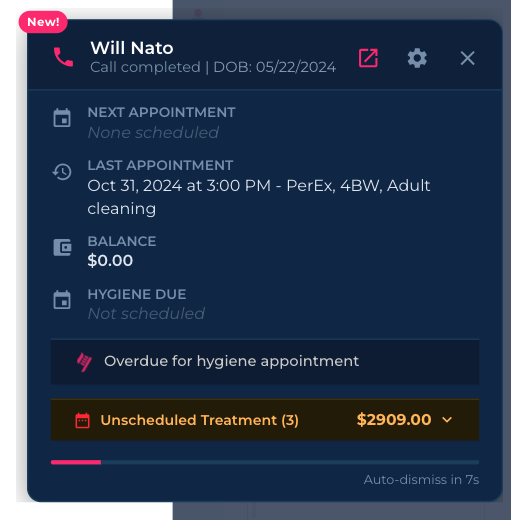
Kasper caller ID call popup for Open Dental showing patient name, next appointment, last appointment, balance, hygiene due date, unscheduled treatment value, and linked patients on incoming call

Kasper's call popup automatically pulls patient data from Open Dental on every incoming call.

A VoIP phone system for dental offices shouldn't just route calls. It should know who's calling, why they're calling, and what to do next. Kasper combines a cloud-based phone system, two-way texting, e-fax, and AI call analytics in a single platform with deep Open Dental VoIP integration — so your front desk has the patient chart on screen the moment the phone rings, and every call is documented automatically.

Phone System for Dental Practices

Everything Your Front Desk Needs to Run the Phones

Replace your phones, voicemail, text messaging, e-fax, and call analytics tools with one platform built for dental offices using Open Dental.

Caller ID Screen Pop

The patient's chart, balance, next appointment, hygiene status, and unscheduled treatment value appear on screen the second the phone rings — pulled live from Open Dental.

Missed Call Tracking

Every missed call is captured, classified, and turned into a task. See callbacks per agent, time-to-callback, and how many missed calls were new-patient leads.

AI Call Transcription

Built-in dental call transcription software. Every call is transcribed, summarized, classified by topic, and written to the patient's commlog in Open Dental.

Two-Way Texting

Send and receive SMS from your office number. Conversations are linked to the patient record. Confirm appointments, send forms, and answer questions without picking up the phone.

HIPAA-Compliant E-Fax

Send and receive faxes from inside Kasper, no fax machine required. Inbound faxes are auto-routed to the right patient record when a number match is found.

Call Analytics & Reporting

Real-time dashboards for total calls, missed calls, average answer time, voicemail volume, agent performance, and topic-level breakdowns. Build custom keyword metrics.

Click-to-Call

Place calls from any patient record in Open Dental or Kasper. Calls auto-log against the chart with full duration, recording, and AI summary attached.

Voicemail Transcription

Voicemails are transcribed in real time, classified, and surfaced to the right team member. Read the message before you decide to call back.

IVR & Auto-Attendant

Self-service IVR builder. Configure each menu key, set timeout actions, transfer to agents or call groups, and choose voices like Belle AI or Josh AI.

Custom Call Schedule

Visual weekly schedule. Route calls to IVR, voicemail, forwarding, or out-of-office greetings by day and hour. 24/7 or fully custom.

Hardware Phone Provisioning

Bring your own SIP desk phones. Provision lines, push directory entries, and reboot phones from the web. Or use the in-browser softphone.

Call Groups & Ring Strategies

Group front desk, hygiene, and billing into call groups. Ring-all or sequential ring strategies. Route IVR keys directly to groups.

Bilingual SMS Auto-Reply

Send English and Spanish auto-replies for missed calls during open and closed hours, plus auto-replies for inbound texts after hours.

Rapid Replies

One-click SMS templates — Confirmation TEXT, Missed Appt, Pending Treatment, and any custom reply your team adds — right inside Patient Feed.

Missed Call Tracking for Dental Clinics

AI-Powered Tasks That Auto-Close When You Reach the Patient

Every missed call, abandoned voicemail, and unreturned outbound voicemail becomes a tracked task. The task auto-closes the moment your team connects with the patient by phone or text — no manual cleanup.

  • Abandoned Missed Calls — tasks for missed calls never returned
  • Incomplete Conversations — calls with fewer than 3 exchanges
  • Short / Interrupted Calls — calls under 10 seconds
  • Abandoned Voicemails — voicemails left without a response
  • Unreturned Outgoing Voicemails — outbound voicemails with no callback

Toggle each task type on or off. Exclude specific users. Auto-close runs on connect.

Tasks Completed Today (35)
Auto-closed
Khaled Awad
☑ Follow up on Khaled Awad
Created: Oct 23 · Updated: Apr 11 by Khaled
#Abandoned Missed CallOct 27, 2025
Kacey Browne
☑ Follow up on Kacey Browne
Created: Sep 22 · Updated: Oct 7 by Khaled
#Abandoned Missed CallSep 26, 2025
Daniel Delahanty
☑ Follow up on Daniel Delahanty
Created: Sep 5 · Updated: Jan 29 by Khaled
#Abandoned VoicemailsSep 09, 2025
Dental Call Transcription Software

Every Call Transcribed, Summarized, and Written to the Chart

Kasper transcribes every call in real time, identifies the topic (cancellation, new patient, billing, insurance, emergency, etc.), and writes a structured summary directly to the patient's commlog in Open Dental — no manual notes from your team.

  • 14+ AI-detected call topics with topic-specific follow-up questions
  • Speaker-separated transcripts you can search and share
  • Sentiment scoring on every call
  • Auto-generated call summary written to Open Dental commlog
  • Recording playback with synced transcript
Sarah Daniels Cancellation
2m 41s · Today
Call Summary
Patient called to cancel her hygiene appointment scheduled for May 14. Reported a work conflict and asked to be rescheduled the following week. Agent rescheduled to May 21 at 10:30 AM.
Action: Send confirmation text for May 21 hygiene appointment.
Call Topics
Did the agent reschedule this patient to a different time?
- Yes
Did the agent ask what the reason for the cancellation was?
- Yes
Sentiment
- Positive
Call Transcription
Hi, I need to cancel my appointment on the 14th — work emergency.
No problem, Sarah. Sorry to hear that. Would the following week work? I have May 21 at 10:30 AM open.
Click any line to jump to that moment in the recording.
Open Dental VoIP Integration

The Phone Call ↔ Patient Chart Loop, Closed

Kasper connects directly to Open Dental. Every event on the phone becomes data in the chart, and every chart event can trigger a call, text, or task.

1. Patient Calls

Caller ID matches the number against Open Dental in milliseconds.

2. Screen Pop

Chart, balance, hygiene, and treatment plan appear before the team picks up.

3. Auto-Logged

AI summary is written to the patient's commlog. No manual notes.

Smart Call Routing

Build Your IVR and Weekly Call Schedule in Minutes

No more begging your phone vendor to change a menu. Configure IVR menus, greetings, hold music, vacation mode, and a day-by-day call schedule yourself, from Phone Settings.

Edit IVR

Set up interactive voice response.
×
Name
Belle AI — Main Greeting
"Thank you for calling. Press 1 for scheduling..."
Key
Action
Target
Timeout
Fallback
Voicemail
1
Transfer to agent
Front Desk
30s
Voicemail
Belle AI
2
Transfer to group
Hygiene
25s
Voicemail
Belle AI
3
Voicemail
Billing
Josh AI
Self-Service IVR Builder

Every Key. Every Route. Every Voice.

For each IVR key, choose Transfer to agent, Transfer to call group, Voicemail, or Sub-menu. Pick a timeout fallback, and choose a greeting voice (Belle AI, Josh AI, or your own recording).

  • Built-in AI voices: Belle AI & Josh AI
  • Or upload your own MP3/WAV greeting
  • Separate greetings: Voicemail, Out of Office, IVR, Vacation
  • Hold music library, with custom uploads
  • Call forwarding and call recording controls
Weekly Call Schedule
Active Now
IVR
Forwarded
Out of Office
Voicemail
SUN
12a–11p
Greeting
MON
12a–9a
Greeting
9a–1p
Belle AI
1p–2p
Lunch
2p–6p
Front Desk
TUE
12a–9a
Greeting
9a–1p
Belle AI
1p–2p
Lunch
2p–6p
Front Desk
WED
12a–9a
Greeting
9a–1p
Belle AI
1p–2p
Lunch
2p–6p
Front Desk
THU
12a–9a
Greeting
9a–1p
Belle AI
1p–2p
Lunch
2p–6p
Front Desk
FRI
12a–9a
Greeting
9a–1p
Belle AI
1p–2p
Lunch
2p–5p
Front Desk
SAT
9a–3p
Belle AI
3p–11p
Greeting
Custom Call Schedule

Different Hours? Different Routes.

Set up exactly how calls flow through your office every hour of every day. The IVR runs during business hours, lunch hour plays a Lunch Greeting, after-hours go to voicemail, and Saturday morning rings your weekend coverage.

  • Drag-and-drop weekly schedule by 30-minute blocks
  • Choose: IVR, Forwarded, Out-of-office, or Voicemail per block
  • 24/7 mode for offices that share an after-hours line
  • Vacation mode override for holiday and closure periods
Two-Way Texting & Auto-Reply

Patient Feed: Every Conversation in One Place

Two-way SMS from your office number, plus bilingual (English + Spanish) auto-replies that fire on every missed call — even after hours. All linked to the patient chart in Open Dental.

Patient Feed
+ New SMS
HE
Henry Elbeck
SK
Samer Karam
JB
Jana Bahloul
AH
Ashley Hynes
LH
Liam Hynes
EH
Elise Hynes
Ashley Hynes ☐ Hide automated messages
Hello, ASHLEY! You have an appointment coming up on Tuesday, May 5th at 2:00 PM at SPF Dental Care. Click here to confirm: kspr.app/…
Hello, ASHLEY! This is Tori from SPF Dental Care. Looking forward to welcoming you tomorrow at 2:00 PM.
💬 Rapid Replies+ Add New
Confirmation TEXT
Missed Appt
Pending Treatment
Patient Feed

One Inbox. Every Patient Text. Every Automation.

Patient Feed is the unified inbox for every text conversation in your office — manual replies and automated messages alike. Hide automation with a single toggle to focus on real conversations.

  • Send and receive SMS from your office number
  • Rapid Replies: one-click message templates
  • Hide automated messages toggle
  • All conversations linked to the patient record
  • Office Chat: internal team messaging in the same app
Missed Call Auto-Reply SMSUpdated!
During office hours: send automated SMS when a call is missed
English Message
Spanish Message
Sorry we missed your call! Feel free to send us a text and one of our staff can respond directly to you as soon as we get a chance.
SMS Auto-ReplyNew!
During closed hours: send automated SMS when a text is received
English Message
Spanish Message
Thank you for your message. Our office is currently closed, but we'll review your text and respond as soon as we get a chance.
Bilingual Automation Settings

Automated SMS in English & Spanish

Patients who can't get through during the lunch rush or after hours don't go to voicemail jail — they get a real, branded text message in their language, and they can respond.

  • Missed-call auto-reply during office hours and closed hours
  • Inbound-SMS auto-reply when the office is closed
  • Edit English and Spanish messages independently
  • 320-character limit per message, character counter included
Call Analytics and Reporting

The Call Metrics Your Office Manager Has Always Wanted

A real-time dashboard for the metrics that drive new-patient capture, scheduling, and front-desk performance — with drill-down into every individual call.

Total Calls
478
May 1 — May 5
Answering Rate
83.61%
↑ Above benchmark
Missed Calls
18
↓ 31% vs last month
Avg Call Duration
1.68m
Healthy range
Incoming Calls
171
↑ Steady
Outgoing Calls
301
↑ 12% vs last month
Voicemails
6
All transcribed
Abandoned Calls
0
Auto-tasks closed
Calls by Caller · Today
Hardware phones & users tracked separately
35 Users
20 Hardphones
55 Total
1
Front Desk 1 HARDPHONE
Hardware phone
14CALLS
2
DB
Dimple Bakshi USER
Front Desk
11CALLS
3
HB
Himanshu Bakshii USER
Front Desk
10CALLS
4
SC
Sarah Chen USER
Office Manager
9CALLS
Plus: filter by sentiment (positive/negative), search inside transcripts, topic-level Q&A scoring, and custom keyword metrics.
Hardware & Routing

Hardware Phones, Call Groups, and Per-Caller Tracking

Bring your own SIP desk phones and provision them in minutes. Build call groups for ring strategies. Every call is tracked back to the right person or device.

Phone Directory
LINE 1
+ Add
+ Add
+ Add
+ Add
✆ Test SPF
15:03
Tuesday, May 5
HistoryDirectoryDNDMenu
+ Add
+ Add
+ Add
+ Add
+ Add
Reboot Phone
Hardware Phone Provisioning

Provision & Manage Desk Phones from the Web

Assign lines, push directory entries, and reboot any handset right from Phone Settings — without crawling under a desk. Calls placed on hardware phones are tracked separately from in-app calls so analytics stay accurate.

  • Bring your own SIP-compatible desk phones
  • Per-line provisioning with shared lines support
  • Remote reboot from the web
  • Hardware-vs-user attribution in Calls by Caller
  • Per-call recording with HIPAA-compliant storage
Available VoIP Users
SS
Shari Sharon
N
natalia@gmail.com
JA
jacy@spf.com
SA
Soniangeliz Abreu
NP
Nicole Padilla
Group: Front Desk
MF
Mo Freij
OA
Omar Awad
Call Groups

Ring the Right Team, Every Time

Create groups like Front Desk, Hygiene, Billing, and Doctor Office. Inbound calls or specific IVR keys can ring the entire group simultaneously or sequentially.

  • Drag-and-drop user assignment
  • Ring-all or ring-sequential strategies
  • Different groups for different IVR keys
  • Shared voicemail boxes per group
  • Excluded users list for AI follow-up tasks
Voicemail
Out of Office
IVR
Vacation
Belle AI
🗑
Custom Greeting
🗑
Josh AI
🗑
Lunch Greeting
🗑
Greetings & Voices

Sound Like the Practice You Want to Be

Manage four kinds of greetings — Voicemail, Out of Office, IVR, and Vacation — from one place. Use built-in AI voices like Belle AI and Josh AI, or upload your team's own recording.

  • Built-in Belle AI & Josh AI voices
  • Upload custom MP3/WAV greetings
  • Different voices for IVR, voicemail, and vacation
  • Hold music library
  • One-click play/download/delete on every greeting
Why Practices Switch

Generic VoIP vs. Kasper VoIP for Dental Offices

Most VoIP providers were built for any small business. Kasper was built for dental practices on Open Dental.

Capability Generic VoIP Kasper VoIP
Cloud-based phone system
Open Dental integration (screen pop, commlog write-back)
AI call transcription with topic Q&AAdd-on
Auto-write call notes to commlog
AI-powered missed-call tasks (5 types)
Self-service IVR builder & weekly call scheduleLimited
Built-in AI voices (Belle AI, Josh AI)
Bilingual (English + Spanish) SMS auto-replies
Two-way SMS with Rapid RepliesLimited
Hardware phone provisioning & remote rebootSometimes
Call groups with ring-all / sequential
HIPAA-compliant e-faxAdd-on
Per-caller analytics with hardware-vs-user split
Sentiment-based + transcript-search call filtering
BAA includedSometimes

Frequently Asked Questions

Common questions from Open Dental practices evaluating VoIP.

What is a VoIP phone system for dental offices?
A VoIP (Voice over IP) phone system for dental offices is a cloud-based phone service that runs over your internet connection instead of traditional copper phone lines. For dental practices, the right VoIP system also integrates with your practice management software (like Open Dental), so every incoming call surfaces the patient's chart, balance, and next appointment, and every call is logged automatically without manual note-taking.
Does Kasper VoIP integrate with Open Dental?
Yes. Kasper is built specifically for Open Dental. Incoming calls trigger a screen pop with patient details pulled live from Open Dental — name, next appointment, last visit, balance, hygiene status, and unscheduled treatment plan value. Call summaries and recordings are written back to the patient's commlog automatically, and you can place outbound calls from any patient record with a single click.
How does missed call tracking for dental clinics work?
Kasper tracks every missed call and abandoned voicemail in a real-time queue. The system creates AI-powered tasks for missed calls, prioritizes them (new-patient calls first), and surfaces them to your team. Tasks auto-close once the patient is reached. You can also see missed-call volume by hour, by agent, time-to-callback, and how many missed calls were lost new-patient leads vs. existing patients.
Does the phone system include call transcription?
Yes. Every call placed through Kasper is automatically transcribed using AI, classified by topic (cancellation, new patient, billing, insurance verification, emergency, etc.), summarized, and written to the patient's chart in Open Dental. There is no separate dental call transcription software to buy or integrate — it's part of the platform.
What call analytics and reporting are included?
Kasper includes a real-time Call Metrics dashboard with Total Calls, Answering Rate, Answered Calls, Missed Calls, Incoming Calls, Outgoing Calls, Voicemails, Abandoned Calls, Average Call Duration, and Calls by Outcome (pie chart). A separate Calls by Caller view breaks down activity per team member and per hardware phone, with a leaderboard of calls made vs. answered. You can also filter calls by sentiment (positive/negative), topic, status (seen/unseen), date range, and search inside the call transcript.
Does Kasper VoIP have an IVR (auto-attendant)?
Yes. Kasper includes a self-service IVR builder. For each menu key (1, 2, 3, etc.) you choose an action — Transfer to agent, Transfer to call group, Voicemail, or sub-menu — and a timeout fallback. You can record IVR greetings or use built-in voices like Belle AI and Josh AI, and apply different IVRs by time of day using Call Schedules.
Can I build a custom call schedule by day of week?
Yes. Kasper includes a visual Call Schedule builder. For each day of the week and each time block, you can choose how calls are handled — IVR, forwarded number, voicemail, or out-of-office greeting. Use 24/7 or build a custom schedule (for example: business hours route to the front desk, lunch hours play a Lunch Greeting, after hours go to voicemail).
Does Kasper support bilingual (English + Spanish) SMS auto-replies?
Yes. Kasper sends automated SMS replies for missed calls and after-hours messages, with separate English and Spanish messages you can edit. There are toggles for during office hours, during closed hours, and for incoming SMS during closed hours — all bilingual.
Do I need to replace my current phones?
No. Kasper VoIP works on your existing computers, smartphones, and standard SIP-compatible desk phones. You can port your existing phone numbers and provision physical handsets directly from the Phone Settings — assign lines, push directory entries, and reboot phones from the web. Your team can also answer calls from the Kasper softphone in the browser.
Does Kasper support call groups for ring strategies?
Yes. Create call groups in Phone Settings and assign VoIP users (front desk, hygiene, billing, etc.). Inbound calls or IVR menu keys can route to a group, ringing all members at once or in sequence.
Does Kasper support two-way texting and fax?
Yes. Kasper VoIP includes integrated two-way SMS texting from your office number and HIPAA-compatible e-fax. Texts and faxes are linked to the patient record in Open Dental. Patient Feed shows every conversation, automated and manual, with a Hide automated messages toggle. Rapid Replies (Confirmation TEXT, Missed Appt, Pending Treatment, etc.) let your team respond in one click.
Is Kasper VoIP HIPAA compliant?
Yes. Kasper signs a BAA with all customers. Calls, recordings, transcriptions, faxes, and texts are encrypted in transit and at rest, with role-based access controls, audit logging, and SOC 2-aligned security practices.
How much does Kasper VoIP cost?
Kasper VoIP is included as part of Kasper's all-in-one platform pricing. Adding new users does not increase your subscription cost. See our pricing page for details, or book a demo and we'll quote your practice based on locations and call volume.

The Phone System Your Open Dental Practice Deserves

See a Kasper VoIP demo with your real call data. We'll show you missed-call recovery, screen pops, call transcription, and the dashboard your office manager will actually use.

Book a Demo → Explore Call Intelligence